This morning I thought of a great way to do this: Opera’s “Small Screen” mode. You can make the browser very small, and it reformats the page accordingly. Check out the 1½-inch Wikipedia page below—still perfectly legible.
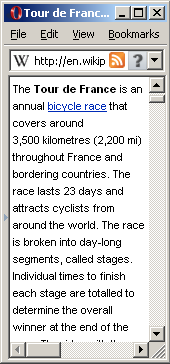
To keep the browser always visible, I put it on top of some empty space in Google Sidebar, on the right side of my monitor. This setup works very well with Yubnub: I can easily check a Wikipedia article by entering “wp tour de france” into the address bar; do a calculation on Google by typing “g 7*24*3600”; look up Amazon reviews using “am visual display of quantitative information”; etc.
Modeless, ambient, augmented access to the world, in a 1½-inch corner of the screen—love it.

I love this. I really like the way you solve small unexpected problems.
ReplyDeleteThanks David! Opera is available on the Mac (and Linux) as well, so you can probably achieve the same effect on those platforms.
ReplyDeleteThat's a great idea -- works nicely with MaxTo or equivalent, just have a little quadrant of a screen set to the little window on the web.
ReplyDeleteIs there a small-footprint, stripped-down version of Opera?
And thanks, as always, for yubnub.
MaxTo is interesting. I’ve been looking for a tool like that.
ReplyDeleteI’m just using regular Opera, but I selected View > Small Screen