Simply download the Trillian chat client, and dock the contact list by dragging it close to the edge of your screen. Make it as wide as you want:
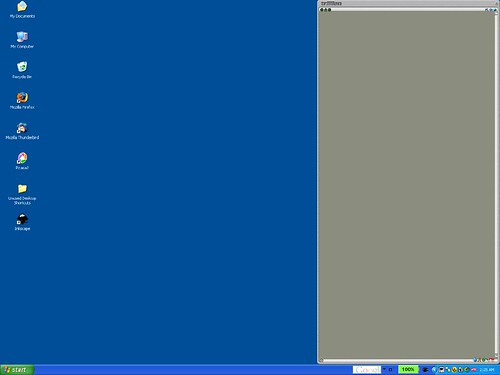
Now when you maximize windows, they confine themselves to the left portion of the screen:
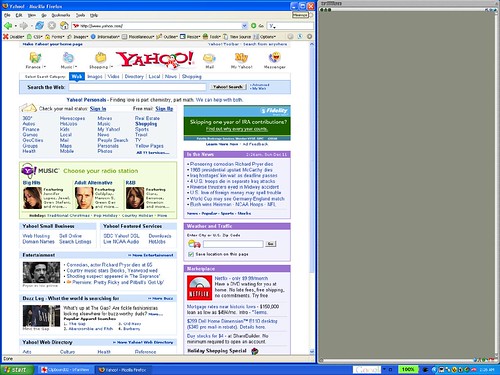
And you can put whatever windows you want on the right side of the screen. The beauty is that these things on the right side won't get covered up when you maximize a window.
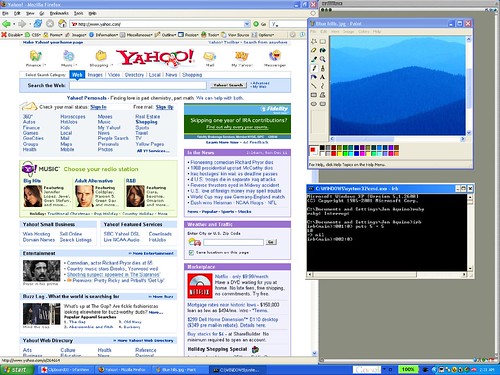
It's kind of like having two monitors. And even if you do have two monitors, it's nice to have this "third monitor" as a little place to put things you want to keep an eye on, like chat clients, or windows that you want to keep visible without covering up other windows.
Cool! I wish my monitor were big enough for this to be useful!
ReplyDeleteHa! Which reminds me of what I really really want for Christmas :-)
ReplyDeleteHi Jon,
ReplyDeleteFirst time posting here. I've been enjoying your blog. Anyway, have you seen "Expose" in MacOSX? It's pretty cool.
Hi Quinn - I am so jealous of you Mac users - you have beautiful machines. yes I have seen Expose and it is awesome. I am sure that Niki likes it.
ReplyDeleteSometimes it's the really basic ideas that are the best. Excellent example.
ReplyDeleteHi Johan - Yeah!
ReplyDeletewow, nice trick!
ReplyDeleteHi Oscar - Yeah, it comes in useful sometimes!
ReplyDeleteThere's a better way to do this now: GridMove
ReplyDelete